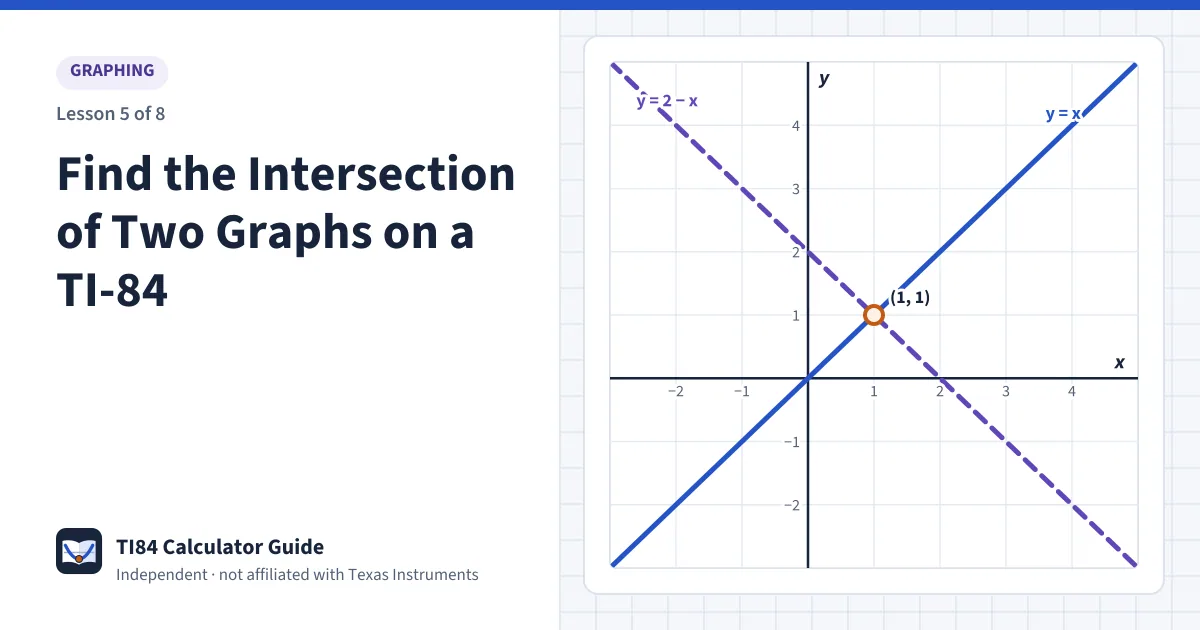
Where two graphs cross, both functions give the same y-value for the same x. That point solves the equation f(x) = g(x) — so finding intersections is also a way to solve equations graphically.
The worked example
We use two lines: y = x and y = 2 − x. Setting them equal, x = 2 − x, so 2x = 2 and x = 1. Then y = 1. The intersection is (1, 1).
Step 1: Graph both functions
- Press Y=. Clear old functions.
Y1=X— press X,T,θ,n.Y2=2−X— press 2 − X,T,θ,n.- Press ZOOM 6. Two lines cross near the origin.
Step 2: Use CALC intersect
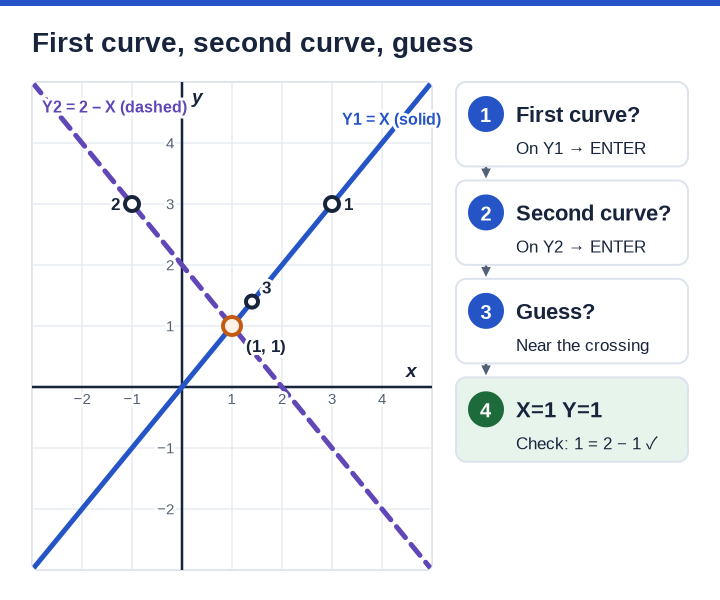
- Press 2nd TRACE (CALC) and choose 5:intersect.
- First curve? The cursor is on Y1 (its name shows at the top). Press ENTER.
- Second curve? The cursor jumps to Y2. Press ENTER.
- Guess? Move the cursor close to where the lines cross and press ENTER.
- The TI-84 shows Intersection X=1 Y=1.
If more than two functions are graphed, use ▲ and ▼ at the curve prompts to move the cursor to the curve you want before pressing ENTER.
Why the guess matters
Curves can meet more than once. y = x² − 4 and y = 2 − x meet at (−3, 5) and (2, 0). CALC intersect returns the crossing nearest your guess, so to find both you run it twice with guesses on each side. (Check: (−3)² − 4 = 5 and 2 − (−3) = 5; 2² − 4 = 0 and 2 − 2 = 0.)
Verify by substitution
A calculator answer is stronger when you check it:
- y = x at x = 1 gives 1.
- y = 2 − x at x = 1 gives 1.
Both equal 1, so (1, 1) is on both lines. On the home screen, Y1(1) and Y2(1) both return 1.
Intersections and equations
To solve an equation such as x² − 4 = 2 − x, graph the left side as Y1 and the right side as Y2 and find their intersections. The x-values (−3 and 2) are the solutions. This is often faster and safer than rearranging, because the graph also shows how many solutions to look for in the window. The systems of equations guide extends this to two-variable systems.
Common mistakes
- Choosing the same curve twice. The second prompt must be on the other function.
- Guess far from the crossing. You may get a different intersection, or an error if the curves do not meet near the guess.
- Parallel lines. y = x and y = x + 1 never meet. The TI-84 reports an error rather than a point; the equations have no solution.
- Intersection outside the window. CALC only searches what is visible; adjust the window first.
Practice
Our independent graphing calculator lists every intersection of two plotted functions inside the visible window — y = x and y = 2 − x give (1, 1). It is not a TI-84 emulator and has no CALC menu, so use it to check results rather than keystrokes.
Sources
- TI-84 Plus Graphing Calculator Guidebook (PDF) — Texas Instruments (checked November 23, 2026)
How this guide was made: written by Paul B. Spicer with AI drafting assistance, following our editorial policy. Key sequences and menu names were checked against the Texas Instruments documents listed above; numeric examples are recomputed by automated tests. Diagrams are original illustrations, not screenshots. TI84 Calculator Guide is independently operated and is not affiliated with, sponsored by or endorsed by Texas Instruments. TI-84 Plus, TI-84 Plus CE and related names are used only to describe the calculators our guides cover. Found a mistake? Send a correction.