A binomial setting has a fixed number of independent trials, n, each with the same probability of success, p. The TI-84 has two commands for it, and the difference between them is one word: exactly or at most.
The worked example
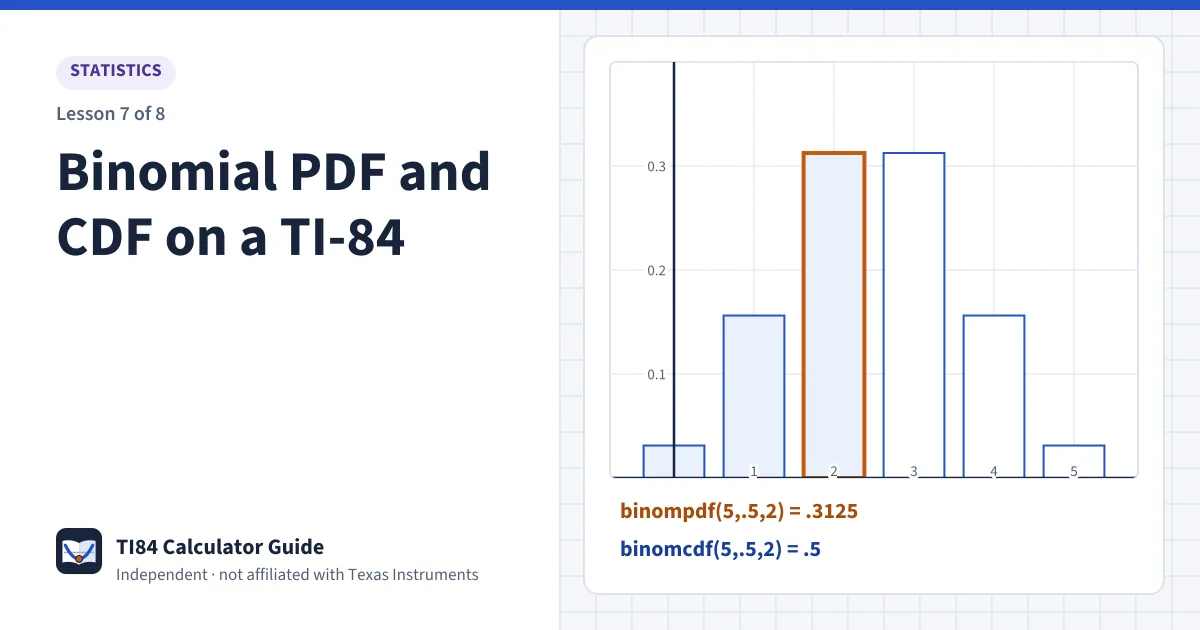
Flip a fair coin 5 times (n = 5, p = .5). Let X be the number of heads.
- P(X = 2) = C(5, 2)(.5)²(.5)³ = 10 × 1/32 = .3125
- P(X ≤ 2) = P(0) + P(1) + P(2) = (1 + 5 + 10)/32 = 16/32 = .5
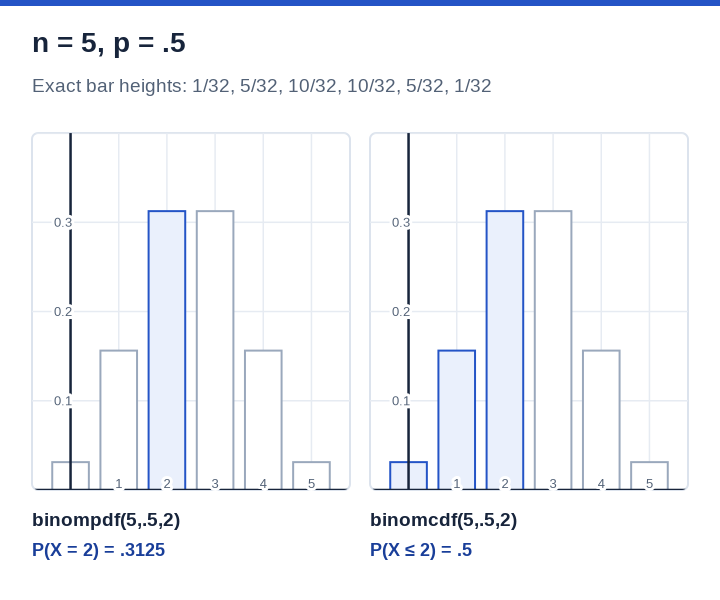
binompdf: exactly x
- Press 2nd VARS (DISTR) and choose binompdf(. Its menu position varies by operating system; scroll if needed.
- TI-84 Plus: type
binompdf(5,.5,2)— trials, probability, x — and press ENTER. CE with wizards: fill trials: 5, p: .5, x value: 2 and choose Paste or Calculate. - Result: .3125.
The TI-84 Plus guidebook shows x as optional: binompdf(5,.5) returns the whole list {.03125 .15625 .3125 .3125 .15625 .03125}. Store it in L2 to graph or check it.
binomcdf: at most x
binomcdf(5,.5,2) → .5. This is P(X ≤ 2) — it includes 2.
Turning words into commands
| Question | Meaning | TI-84 entry | n = 5, p = .5 |
|---|---|---|---|
| Exactly 2 | P(X = 2) | binompdf(5,.5,2) | .3125 |
| At most 2 | P(X ≤ 2) | binomcdf(5,.5,2) | .5 |
| Fewer than 2 | P(X ≤ 1) | binomcdf(5,.5,1) | .1875 |
| At least 3 | 1 − P(X ≤ 2) | 1−binomcdf(5,.5,2) | .5 |
| More than 3 | 1 − P(X ≤ 3) | 1−binomcdf(5,.5,3) | .1875 |
| Between 1 and 3 inclusive | P(X ≤ 3) − P(X ≤ 0) | binomcdf(5,.5,3)−binomcdf(5,.5,0) | .78125 |
“Fewer than” and “more than” exclude the endpoint; “at most” and “at least” include it. Shift the x-value by one accordingly.
Check the setting first
Before using either command, confirm the binomial conditions: fixed n, two outcomes, independent trials and the same p each time. Drawing cards without replacement, for example, changes p from trial to trial.
Common mistakes
- Using binompdf for “at most.” That returns only one bar.
- Off-by-one on “at least.” At least 3 is 1 − P(X ≤ 2), not 1 − P(X ≤ 3).
- Entering p as a percentage. Use .5, not 50.
- Swapping n and x. The order is (n, p, x).
All values on this page were recomputed by our own probability code. We do not provide an online binomial tool; practice on your calculator.
Sources
- TI-84 Plus Graphing Calculator Guidebook (PDF) — Texas Instruments (checked November 23, 2026)
How this guide was made: written by Paul B. Spicer with AI drafting assistance, following our editorial policy. Key sequences and menu names were checked against the Texas Instruments documents listed above; numeric examples are recomputed by automated tests. Diagrams are original illustrations, not screenshots. TI84 Calculator Guide is independently operated and is not affiliated with, sponsored by or endorsed by Texas Instruments. TI-84 Plus, TI-84 Plus CE and related names are used only to describe the calculators our guides cover. Found a mistake? Send a correction.