
TI-84 Plus CE Calculator Guide
The TI-84 Plus CE is the thin, color-screen, rechargeable TI-84. It keeps the familiar key layout and math of the TI-84 Plus while adding textbook-style display, color graphs, fill-in statistics forms and — on the Python edition — Python programming.
Independent overview. TI84 Calculator Guide is independently operated and is not affiliated with, sponsored by or endorsed by Texas Instruments. TI-84 Plus, TI-84 Plus CE and related names are used only to describe the calculators our guides cover.
Hardware at a glance
| Display | 320 × 240 pixels, 2.8-inch, 16-bit color, backlit |
|---|---|
| Power | TI Rechargeable Battery, charged by USB |
| Memory | 149 KB RAM; 3 MB flash for archive and apps |
| Processor | 48 MHz |
| Editions | TI-84 Plus CE and TI-84 Plus CE Python (adds the Python app) |
Charging and battery care
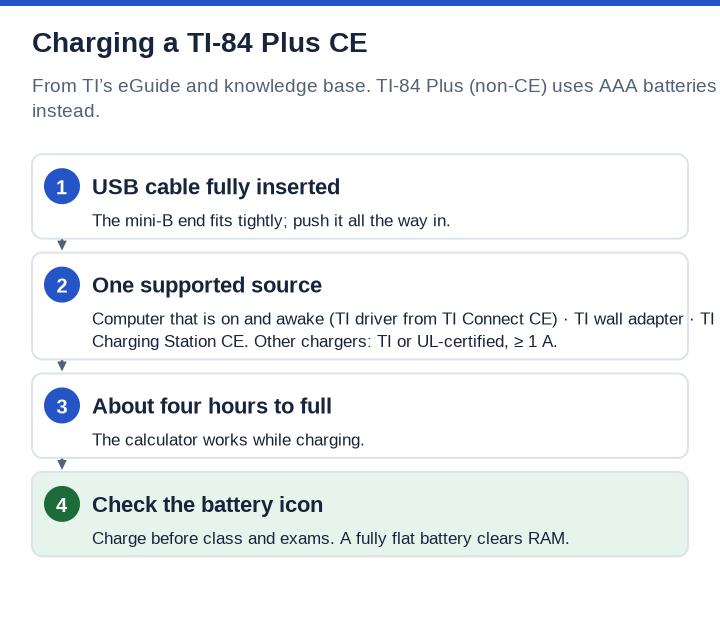
Texas Instruments says a full charge takes about four hours from a computer that is switched on, a TI wall adapter or a TI Charging Station CE, and that the calculator works while charging. Two details matter: a laptop that is asleep may stop supplying power, and a battery that runs completely flat clears RAM. Archive or back up anything important. The charging guide has TI’s full steps.
Features you will meet in lessons
- MathPrint. Fractions, exponents and roots appear in textbook layout, with templates for n/d, d/dx and ∫. Switch to Classic in MODE for one-line entry.
- Shortcut menus. ALPHA with the keys under the screen opens F1 FRAC, F2 FUNC, F3 MTRX and F4 YVAR.
- Stat Wizards. Statistics commands open a form with labeled fields when STAT WIZARDS is on in MODE.
- Numeric Solver. The OS 5.7 guide lists it as MATH C:Numeric Solver with separate left and right sides.
- Reset button. A small button on the back, pressed with a paper clip, clears RAM when the calculator is locked.
- Press-to-Test. A temporary exam mode, started by holding ◄ ► and pressing ON from off.
CE or CE Python?
Only the CE Python edition has the Python app; math, graphing and TI-Basic are shared. An OS update does not add Python to a regular CE. See TI-84 Plus CE vs CE Python.
Start with these lessons
- Fractions and decimals — n/d templates and F◄►D
- Mean and standard deviation — with Stat Wizards
- How to charge a TI-84 Plus CE
- Frozen or not responding — before using the reset button
- Update the CE operating system
- TI-84 online options — TI’s official browser version of the CE
Sources
- TI-84 Plus CE family product support and specifications — Texas Instruments (checked November 23, 2026)
- Getting Started with the TI-84 Plus CE (PDF) — Texas Instruments
- Recharging the TI rechargeable battery — Texas Instruments
Written by Paul B. Spicer · Last updated