
TI-84 Plus Calculator Guide
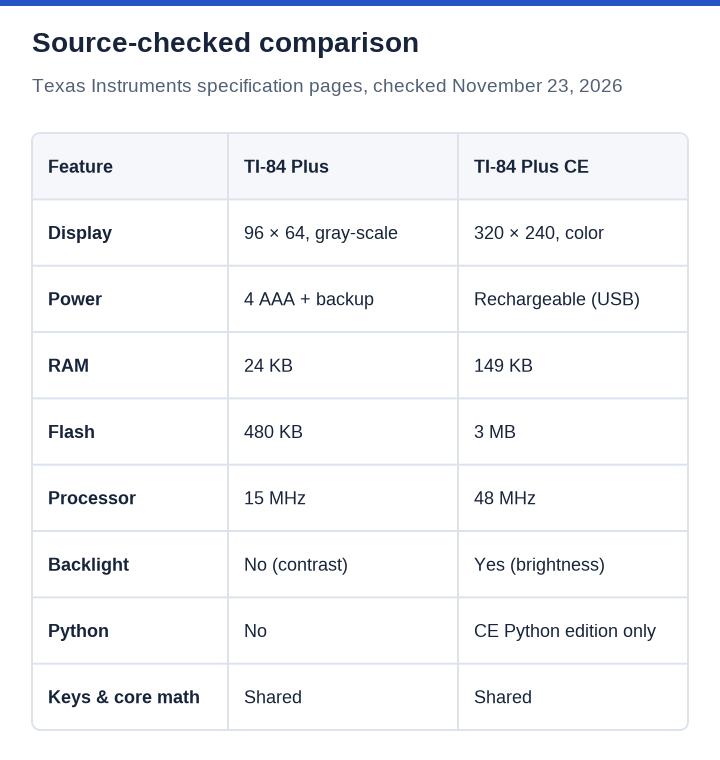
The TI-84 Plus (and its Silver Edition) is the gray-screen, AAA-powered member of the TI-84 family. It runs the same core mathematics as later models, so nearly every lesson on this site applies — but power, display and a few menus need model-specific care.
Independent overview. TI84 Calculator Guide is independently operated and is not affiliated with, sponsored by or endorsed by Texas Instruments. TI-84 Plus, TI-84 Plus CE and related names are used only to describe the calculators our guides cover.
Hardware at a glance
| Display | 96 × 64 pixels; 8 lines × 16 characters; gray-scale, no backlight |
|---|---|
| Power | Four AAA batteries plus a round lithium backup cell |
| Memory | 24 KB RAM; 480 KB flash ROM for archive and apps |
| Processor | 15 MHz |
| Connectivity | USB, plus the older I/O link port; TI Connect CE works over USB |
Living with AAA power
Batteries are the TI-84 Plus’s biggest practical difference. Weak AAA cells cause a dim screen, slow graphs and erratic behavior before the calculator stops altogether. Texas Instruments’ troubleshooting steps start with reinserting the batteries — following the +/− diagram, because the orientation alternates — and then trying a fresh set from one package. Keep spares in your bag before a test.
A blank screen is often a contrast setting rather than a fault: press 2nd then ▲ several times. See TI-84 will not turn on for TI’s full sequence, including when a RAM clear deletes data.
Tasks that look different on the Plus
- Typed arguments. There are no Stat Wizards; commands take arguments after the name, such as
LinReg(ax+b) L1,L2,Y1ornDeriv(X²,X,3). - Diagnostics. To see r and r² after a regression, run DiagnosticOn from the catalog (2nd 0) or set it in MODE on MathPrint operating systems.
- Fractions. MATH 1 (►Frac) and MATH 2 (►Dec) always work; stacked templates depend on a MathPrint OS.
- Solver. The equation solver uses an
eqn:0=line, so rearrange equations to equal zero. - Resetting a locked calculator. With no reset button, TI’s RAM clear uses the batteries and the CLEAR key.
Start with these lessons
- How to use a TI-84 — a complete first session
- Display and settings — contrast, Float and notation
- Solve equations — the eqn:0= solver
- Scatter plots and regression — typed LinReg arguments
- How to reset a TI-84 — what each reset deletes
- TI Connect CE — copy programs off before a reset
Plus or CE?
If you are choosing between models, the comparison guide covers what changes in daily use: TI-84 Plus vs TI-84 Plus CE. For the color model, read the TI-84 Plus CE overview.
Sources
- TI-84 Plus technical specifications — Texas Instruments (checked November 23, 2026)
- TI-84 Plus Graphing Calculator Guidebook (PDF) — Texas Instruments
- Solution 37315: TI-84 Plus family will not turn on or function properly — Texas Instruments
Written by Paul B. Spicer · Last updated